-
-
- Users and access rights - Reference (Sysadmin)
- Supervisor (Mentor and Headteacher) Roles – Configuration (Sysadmin)
- Workflow
- Hierarchy – Reference (Sysadmin)
- Hierarchy – Roles and Permissions (Sysadmin)
- User import by CSV (Sysadmin)
- Manually organising hierarchies
- Profile Pictures and Avatars - System Administrator Guide
-
- Setting up the course catalogue (admin)
- Individual Learning Plans – Template Configuration (Sysadmin)
- Courses - Administration - Reference (Sysadmin)
- Projects – Administration (Sysadmin)
- Bookins mangement - Room and Resources - Administrator Guide
- Terms - Manually Managing Terms (Sysadmin)
- Settings for Learning Objective Reports - System Administrator
- Learning Objectives Repository - Sysadmin
- Learning Objective Repository – Importing via XLSX (Sysadmin)
- Trash Can – Overview (Sysadmin)
- Cross site templates - sysadmin
- Attendance system
-
- Global settings - reference (sysadmin)
- Settings Password Rules (Sysadmin
- Creating Custom labels - admin guide
- Files - Administrator guide
- Accessibility - Overview
- AI Services – Enabling AI Content Creation (Sysadmin)
- Improving Accessibility: Removing iframes
- New Icons and accessibility improvements in itslearning.
-
- Microsoft Cloud Services – Connecting Microsoft 365 to itslearning (Sysadmin)
- Connecting your G Suite domain to itslearning
- Automated integration with a Student Information System
- Test Mode Browser
- ZOOM Admin Set Up Guide
- MS Team Integration - setup
- Student Information System import status emails
- Outlook integration - Paid add-on
- Updating SAML certificates
- Installing the itslearning Testmode Browser Extension in your Google for Education administration console
- LTI Integrations
-
-
- The main menu - Overview
- Log into itslearning - Getting started
- Navigate itslearning - Getting started
- Personal settings - Getting started
- Create your first course - Getting started
- Create your first plan - Getting started
- Adding resources and activities - Getting started
- Resources and activities - Overview
- Creating your first assignment - Getting started (Teacher)
- The Calendar - Getting started
- The message system - Getting started
- Common keyboard shortcuts - Overview
- Tests – Getting Started (Teacher)
-
- Notification Preferences - Teacher and Admin)
- Changing your profile pictures and use avatars - Teachers and students
- Personal Settings in itslearning - Overview - (All users)
- Product Updates – Release Note Sharing (all users)
- Supervisor roles: Mentors and Headmasters - Overview (Teacher)
- Font selection in itslearning - Overview (All users)
- Rich Text Editor - Reference
- Search - overview - (all users)
-
- Course settings - Overview (Teacher)
- Course Participants Page (Teacher)
- Course Templates - Reference (teacher)
- Information hub course – Overview
- Class Course - Reference (Teacher)
- Using the course catalogue (Teacher)
- The permission system - Admin and teacher guide
- Learning Objectives - Reference (teachers)
- Courses – Student View (Teacher)
- Courses – Archiving (Teacher)
- Course Card Images
- Image selector - Teacher guide
- Cross site templates - Teacher
- Self-Paced Courses – Complete Guide
- Teacher - Course Import Guide
- Teacher - Course export guide
-
- Course Templates
- Using custom labels for assignments - teacher guide
- Assignment - Reference (Teacher)
- Tasks - Overview (Teacher)
- Discussions – Reference (Teacher)
- Registrations – Reference (Teacher)
- Learning Paths - Reference (Teacher)
- Tests – Reference article (Teacher)
- Survey Tool - Reference article (Teachers)
- AI Toolkit - Overview and getting started (Teacher)
- Page - Create and Manage Content (Teacher)
- Task & Assignment (teacher)
-
- Reports - Overview (Teacher)
- Assignment Report - Overview (Teacher)
- Progress report - Reference (Teacher)
- Learning Objectives Allignment Report - Overview (Teacher)
- Learning Objectives Progress Report - Overview (Teacher)
- Attendance – Overview.
- 360° Reports – Overview (Teacher)
- 360° Reports – Activity Report (Teacher)
- 360° Reports – Progress Report (Teacher)
- 360° Reports – Grades Report (Teacher)
- 360° Reports – Resources Summary (Teacher)
- 360° Reports – Notifications and Weekly Updates (Teacher)
- Assessment Record / Gradebook - Reference (Teacher)
- ePortfolio – Overview (Teacher)
- ePortfolio – Managing Your Portfolio (Overview)
-
- Microsoft Office templates in the Assignment tool
- Using ZOOM video conferencing in itslearning
- Google templates in the Assignment tool
- Using MS Teams in itslearning and Fronter 19
- Using Google Meet in itslearning and Fronter 19
- Equation editor - iMathEQ
- Accessibility Checker (Plugin)
- MS Teams Integration
- Group collaboration on assignments using G Suite apps
- Integrating OneNote with itslearning
- LTI Tool and integrations
-
-
-
Giving support access to itslearning staff (Sysadmin)
TABLE OF CONTENT
1 Overview
Support access allows authorised itslearning staff to log in to your site and perform system administrative tasks on your behalf. Tasks may include helping to configure your site, delivering training, or troubleshooting issues. All access by itslearning staff is automatically recorded, and you can view the audit log at any time.
Note: There are two separate access options. Enable access for itslearning support grants access to support staff. Enable access for itslearning services grants access to itslearning consultants. Each can be enabled and configured independently.
2 Prerequisites
Prerequisite: You must have system administrator access to manage support access settings.
3 Enabling support access
Support access is managed from the Features and Security settings. You can enable access independently for itslearning support staff and for itslearning consultants, and set an expiry date for each.
Admin > Edit Global Settings > Features and Security > Support access- Go to Admin >
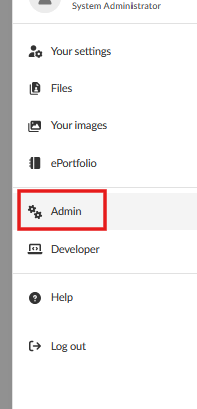
Edit Global Settings >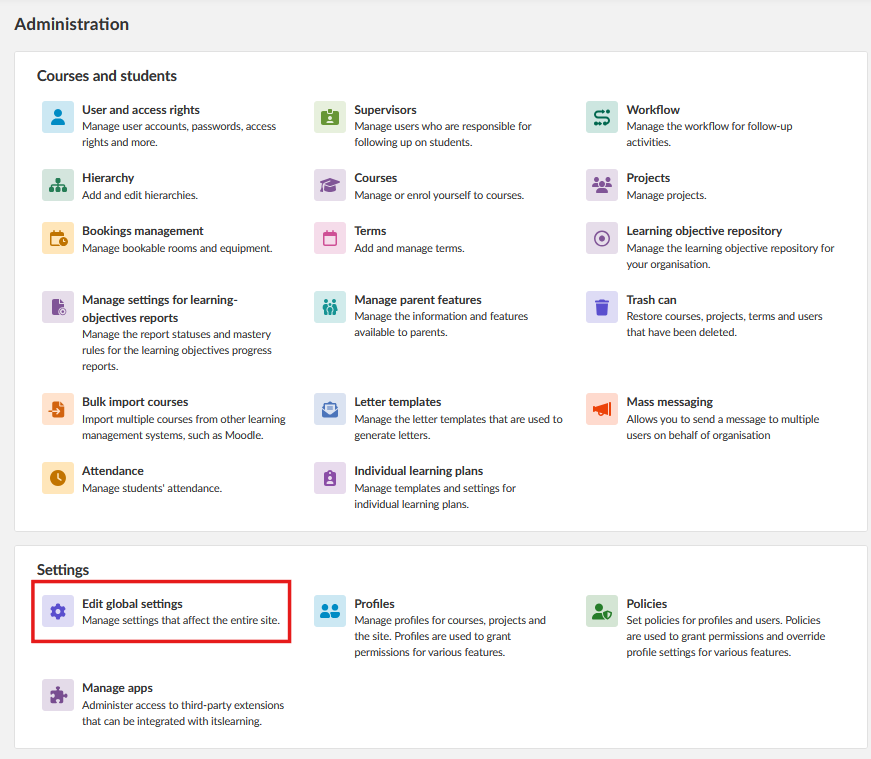
- Features and Security >
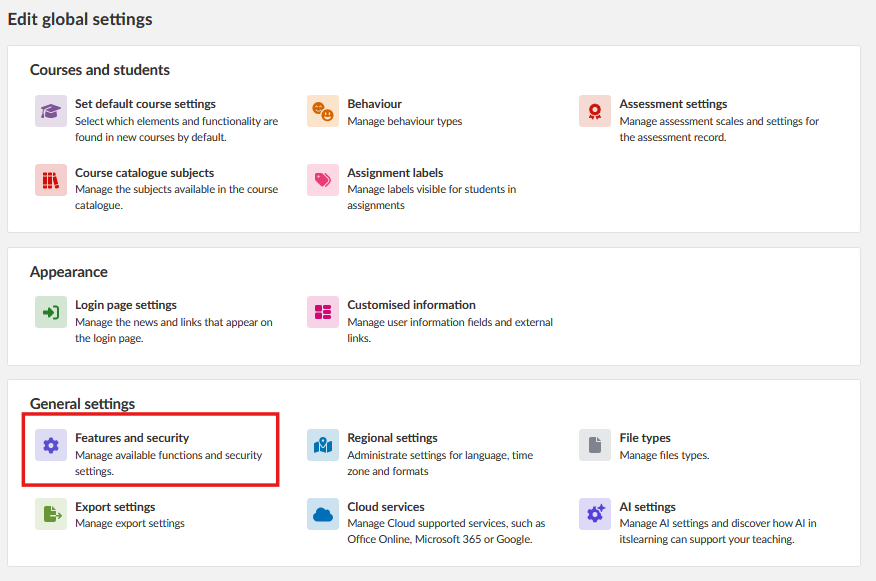
- Support access.
Select Enable access for itslearning supportto grant access to itslearning support staff.Select Enable access for itslearning services to grant access to itslearning consultants.
Set an expiry date for each option. itslearning staff will not have access to your site after the expiry date.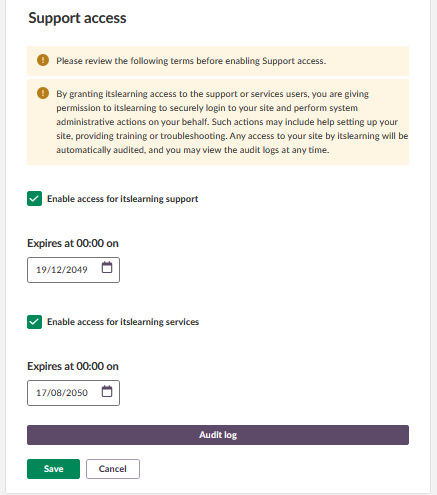
4 Audit log
Every change to the support access settings, and every login by itslearning staff, is recorded in the audit log. To view the log, click Audit log in the Support access settings.
'