Notifications and Messages
TABLE OF CONTENTS
- Introduction
- Who you can message
- Sending a message
- Messaging from courses and projects
- Where messaging is available
- Frequently asked questions
Introduction
The Parent Dashboard includes internal messaging, which you can use to contact your child's school. The bell icon in the top menu shows notifications, and the speech bubble icon gives quick access to messaging.
Who you can message
- You do not have an address book of contacts. To message someone, you need to already know their name.
- If your child has one or more mentors assigned, these are listed at the top of the parent dashboard page.
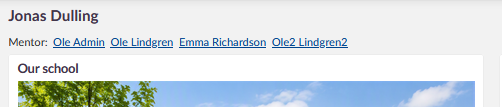
- Whether you can message staff, and which staff, depends on a setting configured by your school. If your school allows messaging staff, you can message any member of staff at the school, not only the teachers who teach your child.
- You can message your own child if your school has enabled this.
- You cannot message other parents directly, unless your school has enabled this.
Sending a message
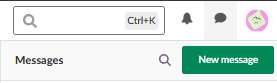
- Click the message icon in the top menu. A badge shows how many messages are unread.

- Click New message to open the message composer.
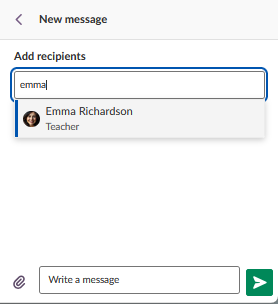
- In Add recipients, search for the person you want to message by name. If you are a member of a course or project, you may also be able to search by that course or project name, depending on your school's setup.
- If you want to message more than one person, add them all to the same conversation. Parents do not have access to the advanced messaging options, such as choosing between individual and group conversations, that some other user roles have.
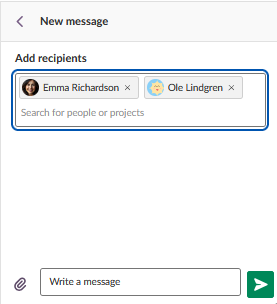
- Write your message. You can add attachments using the paperclip icon.
- Click the arrow button to send your message.
- Return to your messages to view replies and see read and unread status.
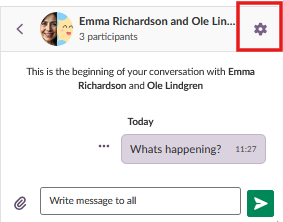
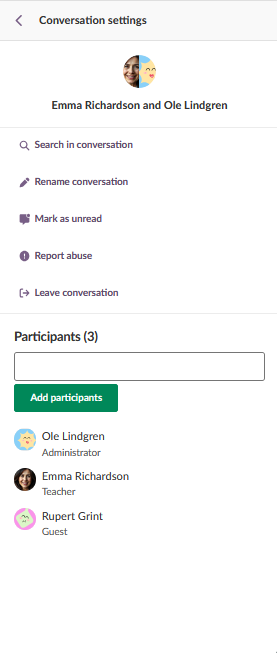
- Click the settings icon (gear) in a conversation to search within the conversation, rename it, mark it as unread, report abuse, or leave the conversation. From the same panel, you can also view the participants in the conversation, including their role, and add participants where this applies.
Messaging from courses and projects
Important: If you are added as a member of a course or project, and your school has enabled the setting that allows initiating communication with members of your own courses and projects, this overrides the rules above. In that case, you can message any member of that course or project, including other parents and students.
Where messaging is available
Note: Messaging is only available through the web-based Parent Dashboard. The Parent mobile app does not include a messaging feature.
Frequently asked questions
Can I message other parents?
Not directly, unless your school has enabled this. You can also message another parent if you are both members of the same course or project and your school has enabled the relevant setting.
Why can't I find someone to message?
There is no address book. You need to already know the name of the person you want to message. Your child's mentors, if assigned, are listed at the top of the parent dashboard page.
Can I message staff from the Parent mobile app?
No. Messaging is only available through the web-based Parent Dashboard, not the mobile app.
Can I choose between a group conversation and individual conversations when messaging several people?
No. This option is available to some other user roles, but not to parents. When you message more than one person, they are all added to the same conversation.
More Help Resources
Have more questions? Please start with asking your school administrator.
Product Release notes
Stay updated with itslearning latest releases: https://itslearning.com/product-updates
Service Status
Check the current status of itslearning services: https://status.itslearning.com/
Ideas Portal
Share your ideas and help shape the future of itslearning: https://ideas.itslearning.com/
Roadmap
Check out our roadmap: https://itslearning.com/global/roadmap/