Reports - Storage Distribution Report (Sysadmin)
TABLE OF CONTENTS
Overview
Admin setting: The report is available under Administration > Reports.
The Storage Distribution Report provides current and historical data on the files stored in itslearning. You can view it either at site level or by organisation (school). The report is updated daily and details where and what types of data are stored across each school.
Site storage is the sum of all files and data stored on a customer site. Most user-created content is defined in five categories:
- Courses
- Users
- Library
- Projects
- Trash
A sixth category, Common, is also displayed in the report. This is not a clearly defined list of file or data types, but the remainder once the five other categories are subtracted from the total site storage.
Note: The Storage Distribution Report shows the total amount of storage used (MB), not which files or types of files are stored.
Report views
At the top of the report, you can filter the data by:
| Filter | Description |
|---|---|
| Show | Select the month to display. |
| Organisation | Limit the report to a specific organisation (school), or view all. |
The report has two tabs: Site Level Report and Organisation Level Report.
Each category can be viewed as pie chart or list by using the icons next to the header over the pie chart.

Site Level Report
The Site Level Report shows the storage for the entire customer site, broken down into the storage categories described below. 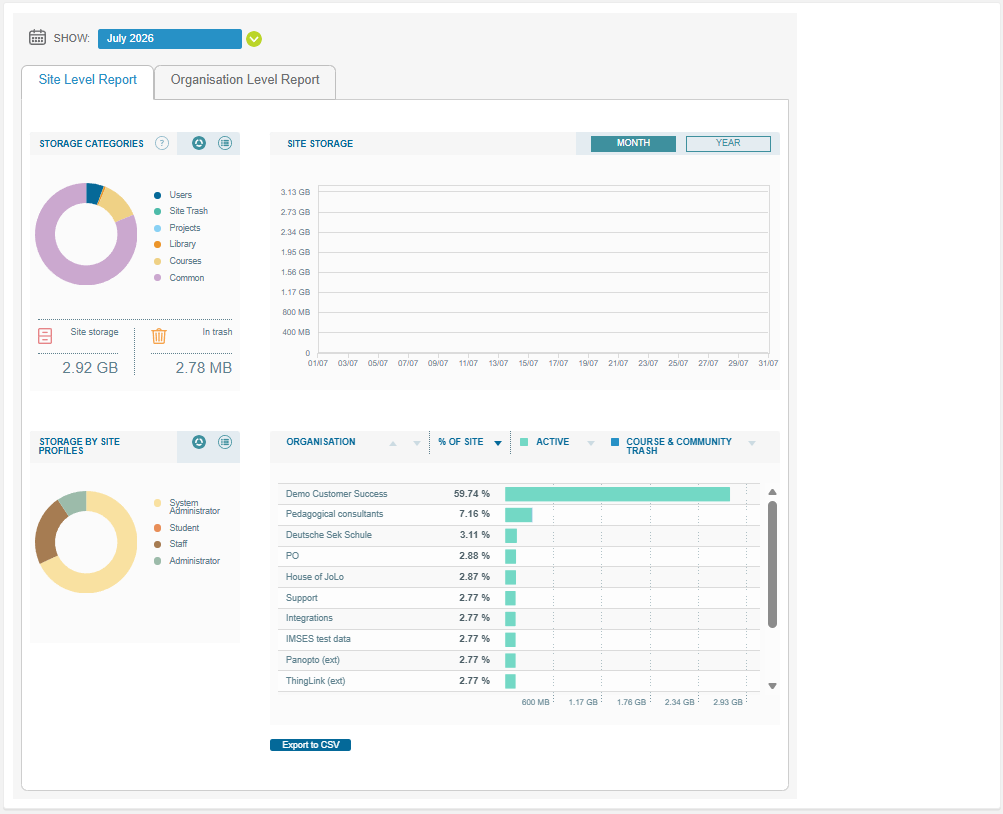
Organisation Level Report
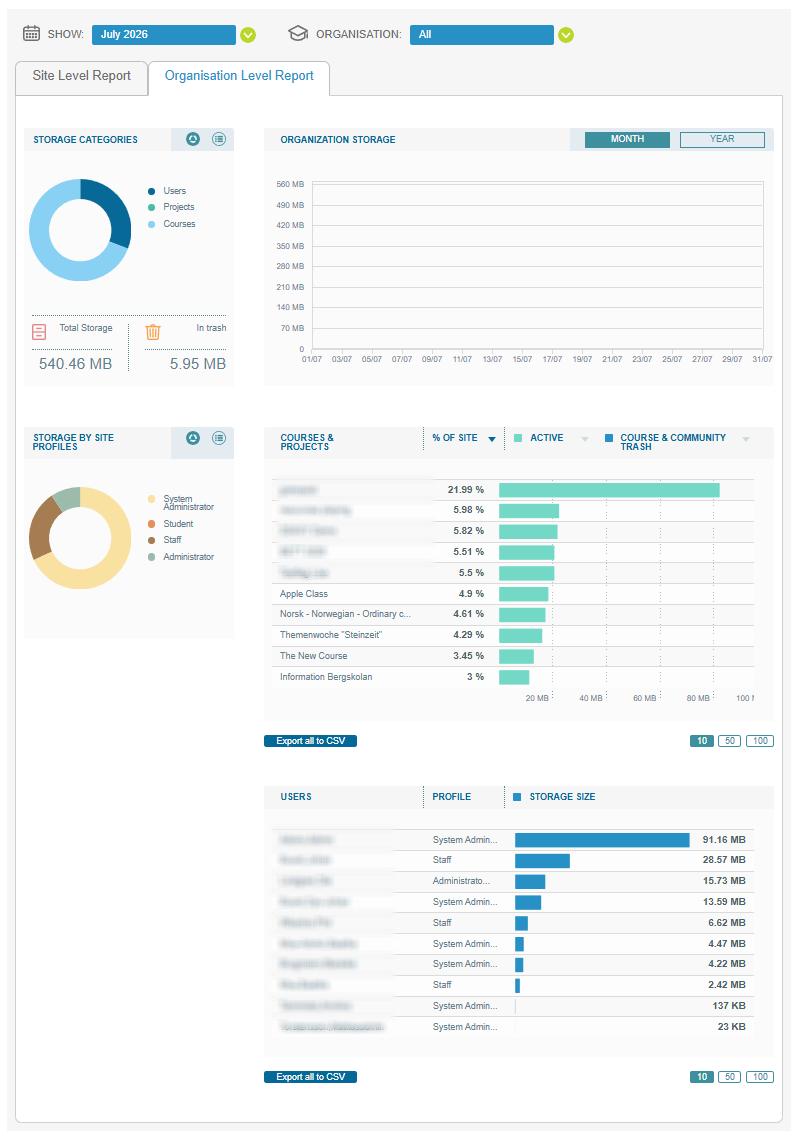
The Organisation Level Report lets you drill down into a single organisation (school). It contains the following sections:
| Section | Description |
|---|---|
| Storage categories | The distribution of storage across categories, along with the total storage and the amount in trash for the organisation. |
| Organisation storage | Storage over time. Switch between Month and Year view. |
| Storage by site profiles | The distribution of storage across site profiles, for example System Administrator, Staff, and Student. |
| Courses & projects | A list of courses and projects with their share of the site storage (% of site), split between active content and course and community trash. Show 10, 50, or 100 rows per page. |
| Users | A list of users with their profile and storage size. Show 10, 50, or 100 rows per page. |
The Courses & projects and Users lists can each be exported using Export all to CSV.
Storage categories
Courses
This category contains all storage that is directly related to any course.
Types of data:
- Files uploaded as part of another element:
- Attached to or submitted in an assignment
- Embedded in a Page or Note
- Files from the Library for which a new version has been created
- File elements in the course (File or folder)
- Old file types like File and Picture with description, and files added in content blocks on old course dashboards
- Files in Course files (found via course settings)
- Files added in the Assessment or Working portfolio
How the category is counted:
- If a file uploaded as Add File/Link is shared to the Library, it is included in Library storage.
- If a course is in the site trashcan, it is not included in this category. It appears in the Site Trash category.
- If an element is in the course trashcan, it is included in this category until it is removed from the course trashcan.
- If a course is deleted, all elements above are counted until the course is permanently deleted from the trashcan.
Users
This category contains all storage that is directly related to any user.
If a user is in the site trashcan, this information is not included in this category. It appears in the Site Trash category.
Types of data:
- Sent message attachments
- Uploads to Your Files, ePortfolio, and working and assessment portfolios in courses
- Dashboards
- Recordings
- Unshared files in the Library
Library
This category contains files added to the Library: all shared files in the Library, and unshared files that have been added to the Library in bulk via the API.
Projects
This category contains all storage that is directly related to any project.
- If a project is in the site trashcan, it is not included in this category. It appears in the Site Trash category.
- If an element is in the project trashcan, it is included in this category until it is removed from the project trashcan.
- If a project is deleted, all elements above are counted until the project is permanently deleted from the trashcan.
Site Trash
Every element, object, and file related to a course, project, or user that is in the site trash (deleted, but not permanently) is counted in this category.
Common
Common storage mainly consists of technical data, but in general contains anything that does not fit into any of the above categories, such as:
- Core customer data needed to make itslearning work, such as user information (user names, roles, profiles) and school data (grades, school structure/hierarchy)
- Task (formerly Custom Activity) attachments
- Historical data associated with users who have left the system
More Help Resources
Have more questions? Please start with asking your school administrator.
Product Release notes
Stay updated with itslearning latest releases: https://itslearning.com/product-updates
Service Status
Check the current status of itslearning services: https://status.itslearning.com/
Ideas Portal
Share your ideas and help shape the future of itslearning: https://ideas.itslearning.com/
Roadmap
Check out our roadmap: https://itslearning.com/global/roadmap/