Product Updates – Release Note Sharing (All users)
TABLE OF CONTENTS
- Introduction
- 1 Overview
- 2 What's new in the Personal menu
- 3 Notification settings
- 4 Notification bell
- 5 Administrator control
- 6 Technical details
Introduction
The profile setting is named: Receive notifications about itslearning product updates and enable 'What's new' in personal menu
itslearning delivers weekly updates to the platform, ranging from minor fixes to larger improvements in the user interface and underlying functionality. These updates are deployed automatically every Wednesday. Release Note Sharing makes it easier for teachers, administrators, and staff to stay informed about recent changes and to review what has been updated during the current or previous month.
Applies to: System administrators, administrators, teachers, and staff. By default, this feature is not enabled for students, parents, or guest users. If needed, administrators can enable it in the profile settings.
1 Overview
Release Note Sharing introduces two new ways to access product update information:
| Feature | Description |
|---|---|
| What's new link in the Personal menu | A permanent link providing direct access to the monthly product update overview at itslearning.com/product-updates. |
| Weekly notification in the notification bell | A weekly notification that appears in the notification bell when itslearning publishes new releases. Clicking the notification takes the user directly to the current month's update page. |
Both features are enabled by default. Users can disable the notification bell component individually via their notification settings. Administrators can disable both features for all users via a profile setting.
2 What's new in the Personal menu
A new link called What's new is available in the Personal menu. Clicking this link takes you to the monthly product update overview on the itslearning website.
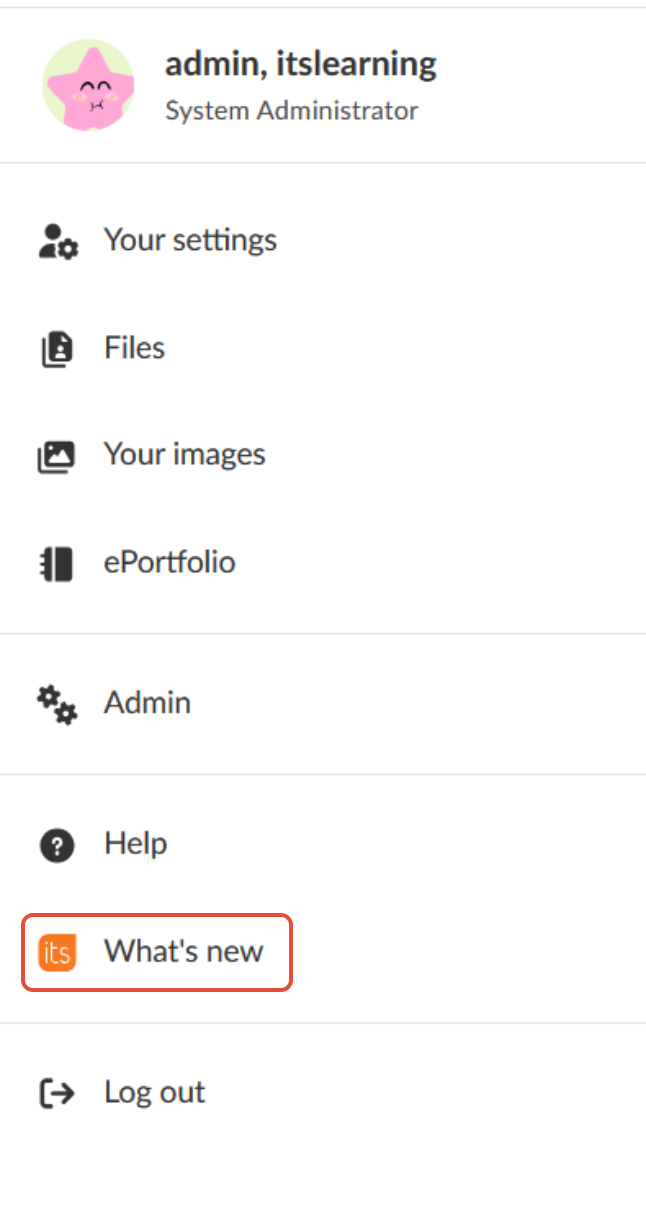
Note: The What's new link is visible to system administrators, administrators, teachers, and staff. It is not visible to students, parents, or guest users.
Admin setting: This link is controlled by the administrator profile setting Receive notifications about itslearning product updates and enable 'What's new' in personal menu. If this setting is disabled, the link does not appear for any user, regardless of individual notification preferences.
3 Notification settings
A new option called Product updates has been added to the Notification settings page. This option controls whether product update notifications appear in the notification bell.
To disable product update notifications:
- Open the Personal menu and select Your settings.
- Go to Notifications.
- Select the Bell notifications tab.
- Locate Product updates and deselect the checkbox.
- Click Save.
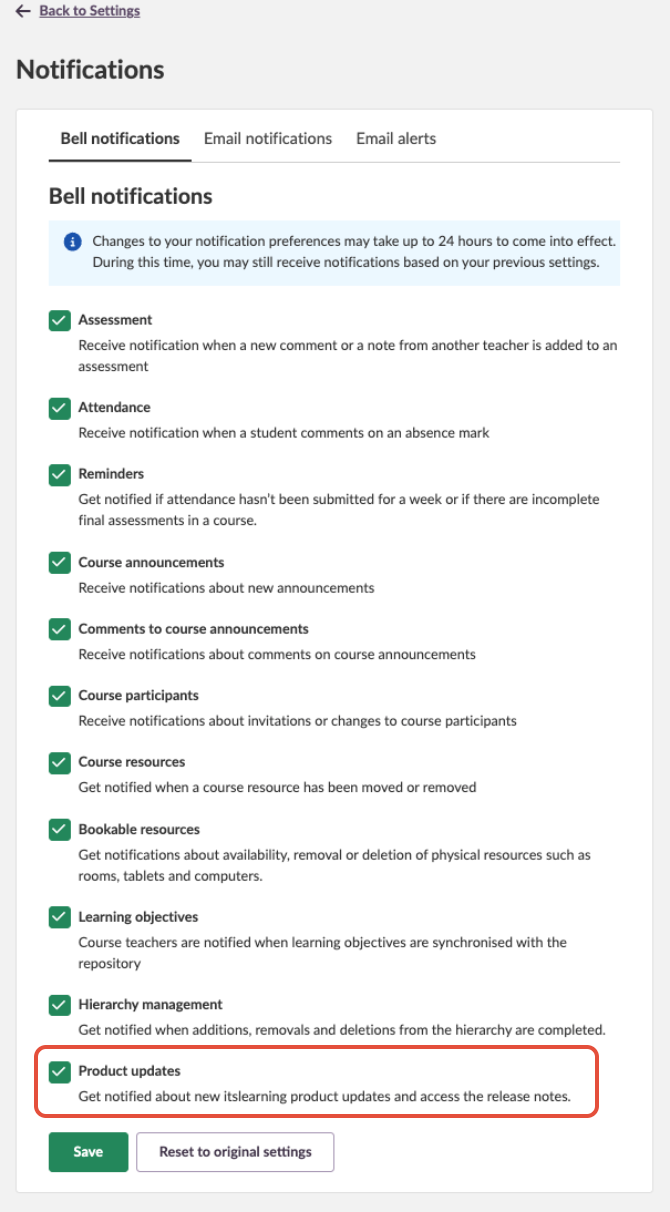
Note: Changes to notification preferences may take up to 24 hours to come into effect.
4 Notification bell
When itslearning publishes a new release, a notification appears in the notification bell. Clicking the notification takes you directly to the product update page for the current month, where all releases for that month are listed.
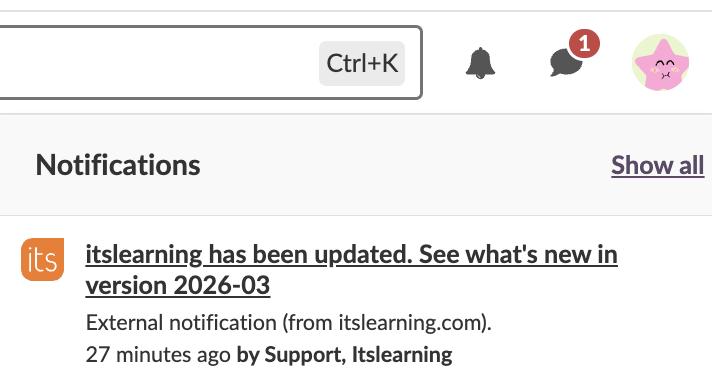
Note: Notifications are sent once per week, typically on Wednesdays. If no release is published in a given week, no notification is sent. Notifications only appear if the feature is enabled both by the administrator and in the user's personal notification settings.
5 Administrator control
Administrators can enable or disable Release Note Sharing for all eligible users through a profile setting. The setting controls both the What's new link in the Personal menu and the product update notifications in the notification bell. The profile setting is named: Receive notifications about itslearning product updates and enable 'What's new' in personal menu

| Setting state | Effect |
|---|---|
| Enabled (default) | The What's new link appears in the Personal menu and product update notifications are sent to eligible users. |
| Disabled | The What's new link is removed from the Personal menu and no product update notifications are sent, regardless of individual user settings. |
6 Technical details
| Detail | Information |
|---|---|
| Notification frequency | Once per week, typically on Wednesdays. |
| Notification trigger | Notifications are sent after a release is confirmed stable, triggered when the deployment reaches the clean-up phase. |
| Notification delay | There may be a delay of approximately 2–3 hours after a release before notifications appear. |
| No release weeks | If no release occurs on a given Wednesday, no notification is sent. |
| Notification settings delay | Changes to notification preferences may take up to 24 hours to come into effect. |
| Update overview URL | https://itslearning.com/product-updates |
More Help Resources
Have more questions? Please start with asking your school administrator.
Product Release notes
Stay updated with itslearning latest releases: https://itslearning.com/product-updates
Service Status
Check the current status of itslearning services: https://status.itslearning.com/
Ideas Portal
Share your ideas and help shape the future of itslearning: https://ideas.itslearning.com/
Roadmap
Check out our roadmap: https://itslearning.com/global/roadmap/