-
-
- Users and access rights - Reference (Sysadmin)
- Supervisor (Mentor and Headteacher) Roles – Configuration (Sysadmin)
- Workflow
- Hierarchy – Reference (Sysadmin)
- Hierarchy - Roles and Permissions (Sysadmin)
- User Management – Importing Users by CSV (Sysadmin)
- Profile Pictures and Avatars - System Administrator Guide
-
- Setting up the course catalogue (admin)
- Individual Learning Plans – Template Configuration (Sysadmin)
- Courses - Administration - Reference (Sysadmin)
- Projects – Administration (Sysadmin)
- Bookins mangement - Room and Resources - Administrator Guide
- Terms - Manually Managing Terms (Sysadmin)
- Settings for Learning Objective Reports - System Administrator
- Learning Objectives Repository - Sysadmin
- Learning Objective Repository – Importing via XLSX (Sysadmin)
- Trash Can – Overview (Sysadmin)
- Cross site templates - sysadmin
- Attendance system
- Calendar – Managing External Calendars for Organisations (Sysadmin)
-
- Automated integration with a Student Information System
- LTI Integrations
- Single Sign-On - Updating SAML IdP Metadata and Certificates (Sysadmin)
- SIS Integration – IMS Enterprise Import Status Emails (Sysadmin)
- Test Mode Browser (Overview)
- Test Mode Browser – Installing the itslearning LockDown Browser Extension for Chromebooks (Sysadmin)
- Microsoft Cloud Services – Connecting Microsoft 365 to itslearning (Sysadmin)
- MS Team Integration - setup
- Outlook integration - Paid add-on
- Connecting your G Suite domain to itslearning
- Swedish integration- Skola24 – Calendar Integration for Swedish Customers (Sysadmin)
- German integration- Univention UCS@school – Provisioning API (Sysadmin)
- German integration- Univention UCS@school - ID Broker Connector (Sysadmin)
- Univention UCS@school – Itswizard) Connector (Sysadmin)
- Dutch integration: Timetable integration -
- Dutch integrations - Timetable Integration Notification – Assigning Appointments
-
-
- Main menu - Overview (Teacher)
- Login - Getting started
- Navigation - Getting started (Teacher)
- Personal settings - Getting started
- Courses - Getting started (Teacher)
- Plans - Getting started (Teacher)
- Resources and activities - Getting started (Teacher)
- Resources and activities - Overview (Teacher)
- Assignments - Getting started (Teacher)
- Calendar - Getting started (Teacher)
- Messages - Getting started (Teacher)
- Keyboard shortcuts - Overview
- Tests - Getting started (Teacher)
-
- Notification Preferences – Overview (Teacher, Admin)
- Profile Pictures and Avatars – Overview (All users)
- Personal Settings – Overview (All users)
- Product Updates – Release Note Sharing (All users)
- Supervisor Roles – Mentors and Headteachers (Teacher)
- Font Selection – Overview (All users)
- Rich Text Editor – Reference (All users)
- Search – Overview (All users)
-
- Course Focus - Choosing the Right Course Type (Teacher)
- Class Course – Reference (Teacher)
- Self-Paced Courses – Complete Guide
- Information hub course – Overview
- Subject Course settings - Reference (Teacher)
- Course Participants Page (Teacher)
- Course Templates – Reference (Teacher)
- Using the course catalogue (Teacher)
- The permission system - Admin and teacher guide
- Learning Objectives – Reference (Teacher)
- Courses – Student View (Teacher)
- Courses – Archiving (Teacher)
- Course Card Images
- Image selector - Teacher guide
- Course Templates – Cross-Site Templates (Teacher)
- Teacher - Course Import Guide
- Teacher - Course export guide
-
- Resources – Overview (Teacher)
- Resource Page – Reference (Teacher)
- Immersive Reader – Overview (All users)
- Test – Updating from Test 2.0 to Test 3.0 (Teacher)
- Files – Overview (Teacher, Student)
- Files – Saving Course Materials (All users)
- Library – Reference (Teacher)
- Brand Icons – Reference (All users)
- H5P – Upload and Play Content (Teacher)
-
- AI Toolkit – Overview and Getting Started (Teacher)
- AI Toolkit – Prompt Suggestions (Teacher)
- Assignment – Reference (Teacher)
- Tasks – Overview (Teacher)
- Discussions – Reference (Teacher)
- Registrations – Reference (Teacher)
- Learning Paths – Reference (Teacher)
- Tests – Reference (Teacher)
- Survey Tool – Reference (Teacher)
- Page – Create and Manage Content (Teacher)
- Assignment – Combined Assignment and Task Tool (Teacher)
- Assignment – Custom Labels (Teacher)
- SCORM – Importing and Using Content (Teacher)
-
- Reports - Overview (Teacher)
- Assignment Report - Overview (Teacher)
- Progress Report – Reference (Teacher)
- Learning Objectives Alignment Report - Overview (Teacher)
- Learning Objectives Progress Report - Overview (Teacher)
- Attendance – Overview (Teacher)
- 360° Reports – Overview (Teacher)
- 360° Reports – Activity Report (Teacher)
- 360° Reports – Progress Report (Teacher)
- 360° Reports – Grades Report (Teacher)
- 360° Reports – Resources Summary (Teacher)
- 360° Reports – Notifications and Weekly Updates (Teacher)
- Assessment Record / Gradebook - Reference (Teacher)
- ePortfolio – Overview (Teacher)
- ePortfolio – Managing Your Portfolio (Teacher)
-
- LTI tool – adding external tools to a course (2026)
- H5P integration – Creating a Learning Activity in a Plan (Teacher)
- Microsoft Office templates in the Assignment tool
- Google templates in the Assignment tool
- Using MS Teams in itslearning and Fronter 19
- Using Google Meet in itslearning and Fronter 19
- Equation editor - iMathEQ
- Accessibility Checker (Plugin)
- MS Teams Integration
-
-
-
Giving support access to itslearning staff (Sysadmin)
TABLE OF CONTENTS
1 Overview
Support access allows authorised itslearning staff to log in to your site and perform system administrative tasks on your behalf. Tasks may include helping to configure your site, delivering training, or troubleshooting issues. All access by itslearning staff is automatically recorded, and you can view the audit log at any time.
Note: There are two separate access options. Enable access for itslearning support grants access to support staff. Enable access for itslearning services grants access to itslearning consultants. Each can be enabled and configured independently.
2 Prerequisites
Prerequisite: You must have system administrator access to manage support access settings.
3 Enabling support access
Support access is managed from the Features and Security settings. You can enable access independently for itslearning support staff and for itslearning consultants, and set an expiry date for each.
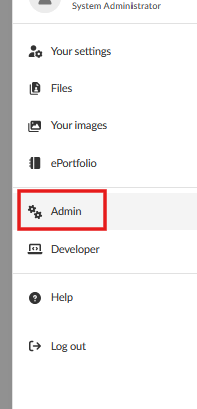
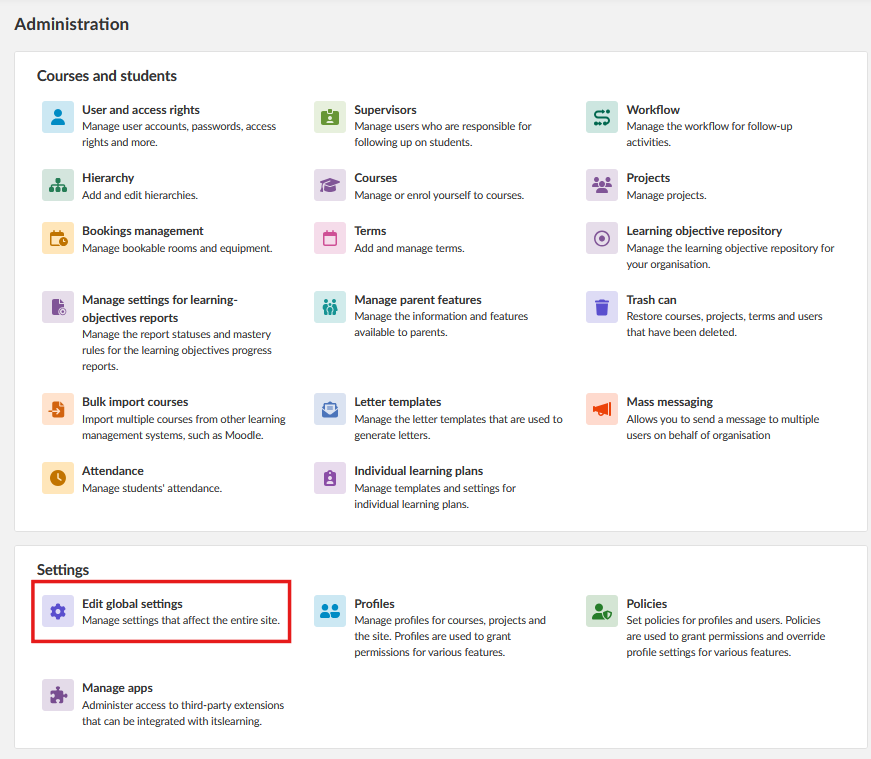
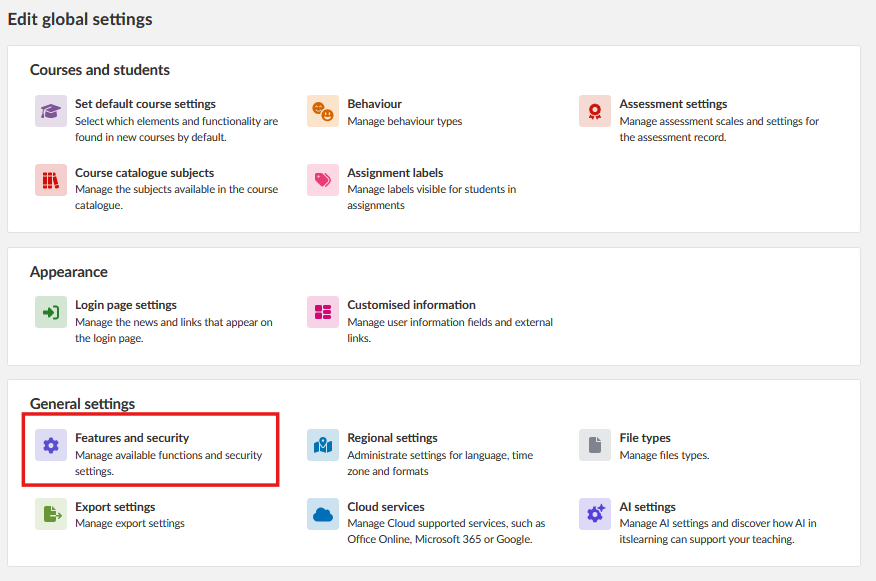
Admin setting: Admin > Edit Global Settings > Features and Security > Support access
- Select your profile picture in the top-right corner, then select Admin.
- Select Edit Global Settings.
- Select Features and Security, then Support access.
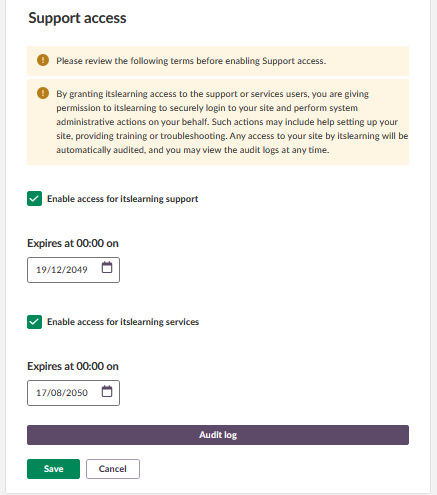
- Select Enable access for itslearning support to grant access to itslearning support staff. Select Enable access for itslearning services to grant access to itslearning consultants.
- Set an expiry date for each option. itslearning staff will not have access to your site after the expiry date.
4 Audit log
Every change to the support access settings, and every login by itslearning staff, is recorded in the audit log. To view the log, click Audit log in the Support access settings.
More Help Resources
Have more questions? Please start with asking your school administrator.
Product Release notes
Stay updated with itslearning latest releases: https://itslearning.com/product-updates
Service Status
Check the current status of itslearning services: https://status.itslearning.com/
Ideas Portal
Share your ideas and help shape the future of itslearning: https://ideas.itslearning.com/
Roadmap
Check out our roadmap: https://itslearning.com/global/roadmap/