A day in the life of a teacher using the AI Toolkit
itslearning AI Toolkit
A day in the life of a teacher using the AI Toolkit
Follow Ms Berg as she prepares a new science unit in the gaps between lessons. It starts with a word nobody in the class can explain, and ends with a finished unit before she cycles home.
Set up once
AI Settings saved to the course apply to every tool you use there.
Same steps in every tool
Write a prompt, generate, review and save. Then edit in the tool as usual.
You stay in charge
Every result is a draft. You decide what reaches your students.
Ms Berg's day at a glance
A new unit exists only as a sticky note: rain?
A student asks what humidity is.
AI Settings and Glossary.
Inspire Me meets a sceptical colleague.
One assignment becomes three.
A test is generated and reviewed.
The unit is ready. The sticky note goes in the bin.

1 A unit on a sticky note
Ms Berg teaches science to two classes of 13- and 14-year-olds, 8A and 9B. On Monday, both classes start a new unit on weather and climate. It is Wednesday, it is raining, and so far the unit is a heading in her plan and a sticky note that says rain?
Her school has just joined the AI Toolkit pilot. She has tried it once, for about five minutes.
In the staffroom, her colleague Jonas is already at the good table by the radiator. “Have you tried the AI thing yet?” he asks. “I'll wait until someone tells me it's worth it.”

2 The word nobody can explain
8A are finishing their last unit, and Ms Berg asks what they already know about weather. Clouds. Wind. Rain, obviously. Everyone has noticed the rain.
Nobody answers. Ms Berg realises that humidity is only the first of the words that will get in the way. Precipitation and air pressure will follow, as they do every year.

3 Setting the scene once
Ms Berg opens the course for 8A. The first time she used the AI Toolkit, it showed her the AI Guidelines. The main points stayed with her: review all content, keep personal student data out of prompts, and remember that the teacher decides what reaches the class.
She starts with the AI Settings:
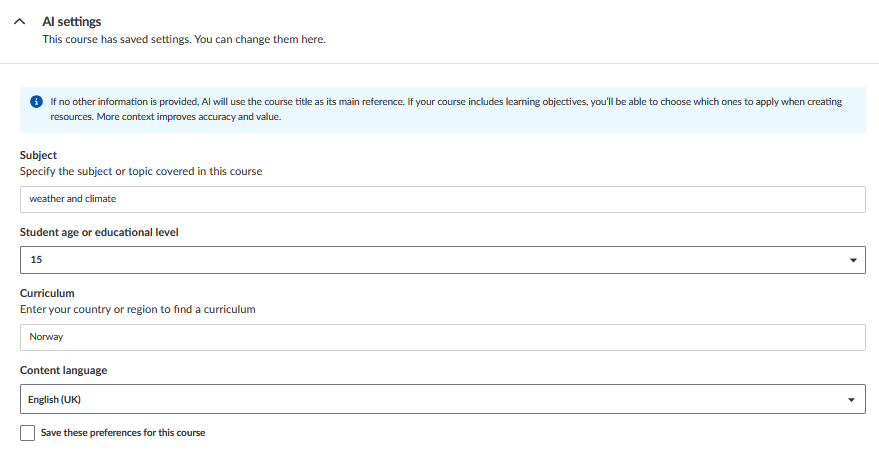
She saves the settings to the course. From now on, every tool she opens in this course knows who the content is for, so she does not need to repeat it in each prompt.
4 Twelve words before Monday
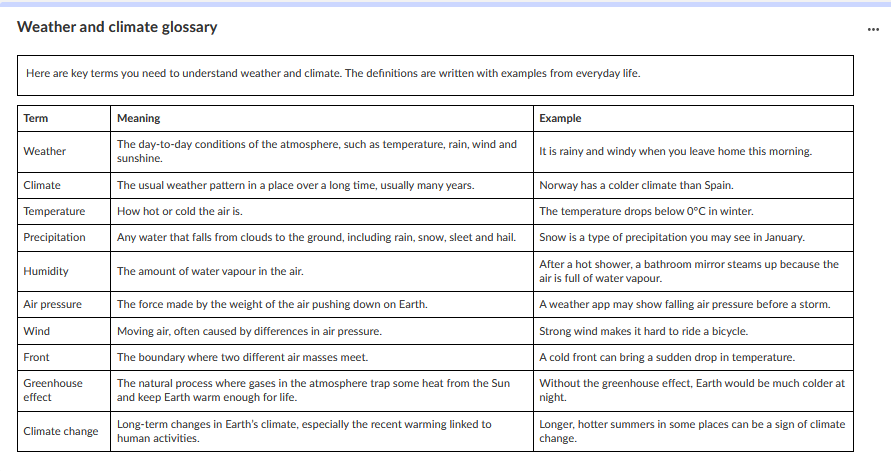
Next, she opens the Glossary tool, selects 10 entries and writes the prompt she has been thinking about since 08:30:
The result works. Humidity is explained with a bathroom mirror after a hot shower, and Emil will like that. She shortens one definition herself and saves the glossary.
5 Three classes in one
9B is the class that keeps Ms Berg on her toes. Four students finish every task in half the time and start rearranging the pencil cases. Three others need a lot of support just to get started. Today goes as it usually does. By minute ten, the fast ones are bored and the others are still reading the instructions.

6 Showing the sceptic
“So? Worth it?” Jonas asks over his sandwich.
Instead of answering, Ms Berg opens Inspire Me and asks for five ways to start the weather unit that do not rely on long texts. Two of the ideas are familiar. The third is new to her: students keep a simple weather log from the classroom window for a week and compare it with the forecast.
It is the closest Jonas gets to a compliment.
Did you know?
Each suggestion from Inspire Me describes the activity, the materials needed and the expected outcome, so you can judge quickly if it fits your class. The type of activity you ask for affects the detail level, so a starter idea will be much shorter than something you would use over a week.
7 One assignment, three versions
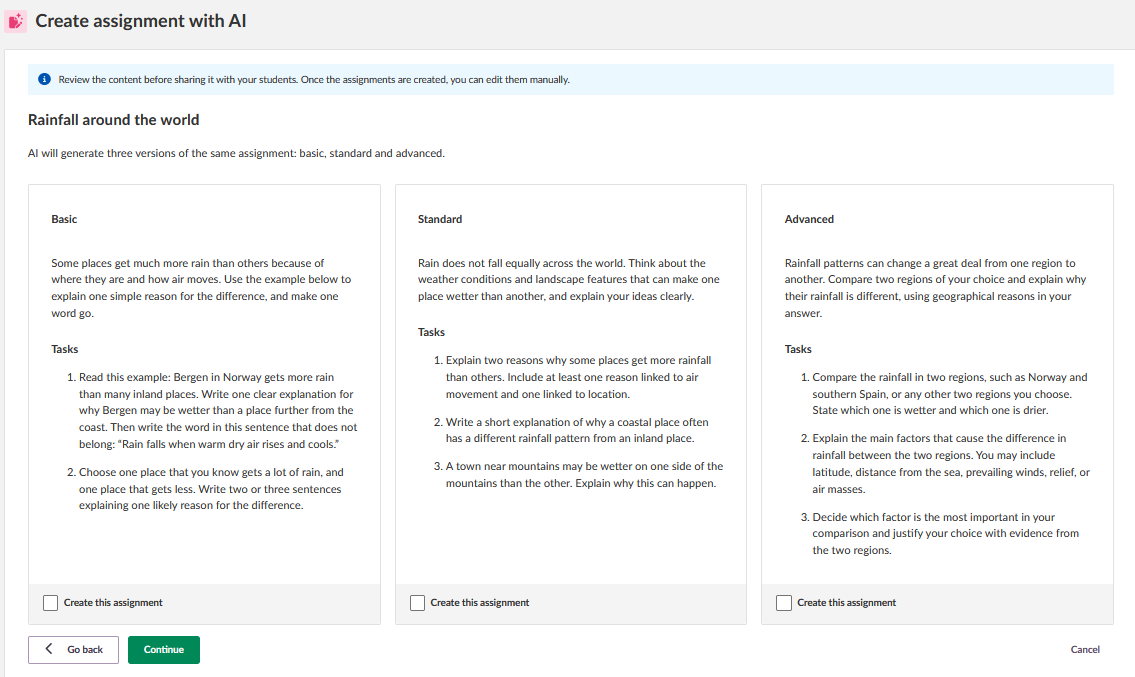
9B is still on her mind. Ms Berg opens the Assignment tool in the 9B course and turns on Differentiation. She asks for an assignment on why it rains more in some places than others. The basic version should be concrete, the standard version balanced and the advanced version open-ended.
Three versions appear:
A concrete task with a clear example. One word in it has to go.
A balanced task for most of the class. It works as it is.
Compare rainfall in two regions and explain the difference.
Three versions appear side by side: basic, standard and advanced. The topic is the same, but the level of support and the demands on the students are different.
Ms Berg reads through all three before creating them. The basic version gives students more structure and guidance. The standard version asks them to explain and compare. The advanced version expects them to work more independently with evidence and reasoning.
She likes the overall progression, but there is still something she wants to change. Rather than generate everything again, she decides to make the adjustment herself after creating the assignments. The AI has given her three starting points. What the students actually receive is still her decision.
8 A test, and one question she deletes
Now the building is quiet. Ms Berg opens the Test tool and asks for 12 questions on weather and climate, with a mix of question types and difficulty adjusted to the age group.
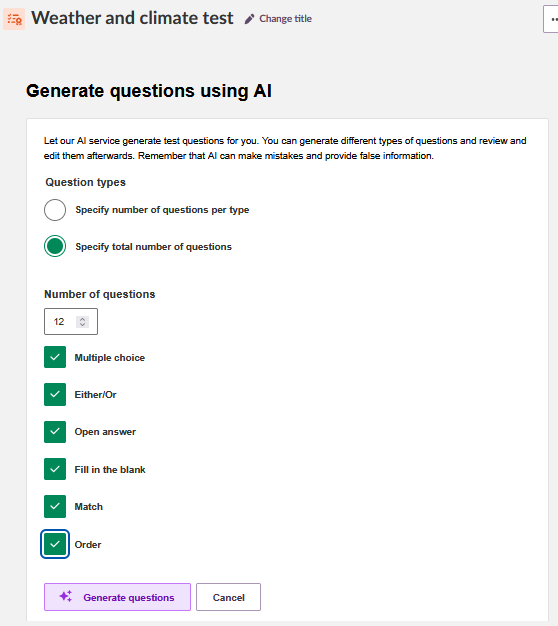
She reads the test the way she would read one from a colleague. Most of it holds. One question asks which city has the most rainfall in Europe. She is not sure the answer is right, and she cannot check it quickly. She deletes it and writes her own.
9 Ready for Monday
It is still raining when Ms Berg cycles home. On Monday, 8A will start a weather log, and Emil will know what humidity is. 9B will get one assignment in three versions, none of which she had to write from scratch.
The sticky note that says rain? goes in the bin.
One small note. One finished unit.
What Ms Berg made today
12 key terms with everyday examples
An opening activity for the whole unit
Basic, standard and advanced versions
Reviewed and adjusted by hand
Ready to try the AI Toolkit?
Start with the overview, then find prompt templates for every tool in the Prompt Library.
AI Toolkit Overview (Teacher) →