Integrations - Manage API and IMS Enterprise Web Services (Sysadmin)
TABLE OF CONTENTS
- 1 Overview
- 2 Manage API
- 3 About the Organisation API
- 4 Manage IMS Enterprise Web Services
- 5 About IMS Enterprise Services
- 6 Planning a new integration
Introduction
System administrators can manage API access and IMS Enterprise Web Services integrations directly from the Administration menu. These tools allow external systems to exchange data with itslearning, for example to build learning tools, embed content, or integrate existing applications into the platform.
Prerequisite: A site profile setting configured by a system administrator is required to gain access to Administration > Manage API and IMS Enterprise Web Services Management.
1 Overview
Two related management areas are available in the Administration menu:
| Area | Purpose |
|---|---|
| Manage API | Enable or disable API access for the site. |
| Manage IMS Enterprise Web Services | Add and remove integrations, and view integration logs. |
IMS Enterprise Web Services are used by some Student Information Systems (SIS) to share users and groups with the LMS and other systems.
Note: Technical documentation for developers is available at https://developer.itslearning.com/.

2 Manage API
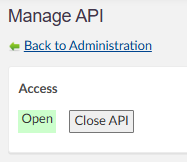
In this Administration menu, you can enable or disable API access for your site.
3 About the Organisation API
The Organisation API is a series of web services designed to move large quantities of user content from external systems to itslearning. The most common use for the API is to migrate user data such as files, and course-specific data such as IMS packages, tests, links, and assignments from a legacy platform to itslearning.
For the bulk of content, this is a one-way migration: once the data is migrated to itslearning, it cannot be accessed or amended through the API. However, for some applications, including timetable, assessment, and archival systems, the same API can be used to read from and update data in itslearning, synchronising it over time and keeping it up to date.
3.1 Web services in the API
| Service | Function |
|---|---|
| DataService.svc | The main service for interacting with itslearning. It handles all asynchronous messages (AddMessage), returns available message types (GetMessageTypes), reports the status of queued messages (GetMessageResult), and lists supported extensions (GetExtensions). |
| ReadDataService.svc | Processes all Read messages synchronously, so data can be read from itslearning in real time. |
| FileService.svc | Uploads a single file into a temporary content import storage area and returns a unique identifier that can be referenced in later messages. |
The Organisation API supports both synchronous and asynchronous processing of messages. Asynchronous messages are processed in the order they arrive, but not necessarily instantly. The system is nominally open 24/7, other than during planned outages.
3.2 Obtaining access to the Organisation API
Access to the Organisation API is provided through the itslearning Local and Global Services Team, who work with partners to set up access:
- Agree which methods (organisation services) are required. Access can be filtered on a message-by-message level.
- The services team member completes an authorisation form for access to be set up.
- The services team member provides the partner with a unique username and password for WS-Security.
- The partner can now access the specified services based on the provided credentials.
Note: The Organisation API is scoped to specific site access. Each username and password pair is unique to the partner and the site it accesses. A partner with access to two sites has two sets of credentials.
4 Manage IMS Enterprise Web Services
In this section of the Administration menu, you can add and remove integrations and view the logs of the last 7 days. If you require log information beyond this period, or if you have questions about integrations previously connected by our team, please contact itslearning support.
5 About IMS Enterprise Services
The IMS Enterprise Services specification, published by the IMS Global Learning Consortium, defines how systems manage the exchange of information that describes people, groups, and memberships within the context of learning.
itslearning supports the bulk of the specification and adds certain extensions covering functionality not present in IMS Enterprise Services by default. The parts not supported by itslearning mainly relate to features that are not applicable to itslearning as a learning platform.
The services and methods implemented by itslearning are grouped by their main function:
- Managing persons
- Managing groups
- Managing memberships
Note: An IMS ES template written in C# is available for download from the developer site. It acts as a wrapper around the general IMS ES framework and only uses the parts that are actually used in itslearning.
5.1 Service access and environments
To obtain access to a development environment, you must be a licensed customer or a system integration partner. Contact your local itslearning team for more information.
| Environment | Base URL | Accessible by |
|---|---|---|
| Test server (stable) | https://enterprise.itslintegrations.com/WCFServiceLibrary/ImsEnterpriseServicesPort.svc | Customers and system integrators for the duration of the implementation project |
| Production server AWS (EU) | https://eu1enterprise.itslearning.com/WCFServiceLibrary/ImsEnterpriseServicesPort.svc | Licensed customers in Europe and worldwide |
6 Planning a new integration
Are you planning a new integration with itslearning, or do you want to connect other new applications and need assistance? Please contact your Account Manager.
More Help Resources
Have more questions? Please start with asking your school administrator.
Product Release notes
Stay updated with itslearning latest releases: https://itslearning.com/product-updates
Service Status
Check the current status of itslearning services: https://status.itslearning.com/
Ideas Portal
Share your ideas and help shape the future of itslearning: https://ideas.itslearning.com/
Roadmap
Check out our roadmap: https://itslearning.com/global/roadmap/