Reports - Advanced Reporting (Sysadmin)
TABLE OF CONTENTS
Overview
Prerequisite: Advanced Reporting is an optional service. Contact your local Key Account Manager to enable it for your site.
Advanced Reporting is a set of detailed visual reports aimed at school authorities who want to view data from all schools. It is a suite of report templates that provide insight into user engagement, curriculum management, and student progress. The reports are geared towards administrator use and enable comprehensive views across a department or grade level, a school, or an entire site.
Like the standard reports, Advanced Reporting is found under Administration > Reports. Each template has a set of standard views and filters. You can choose between Template Advanced Reports and Customised Advanced Reports.
Reports can be exported in whole or in part in the following formats:
- CSV
- Image
Note: Some reports are restricted in time span due to large amounts of data. Filters (typically on the right side of a report) in most cases only show values for which there is data. For example, you cannot filter logins on an organisation in which nobody logged in during the selected time period.
Template Advanced Reports
The following report templates are built by itslearning and available to all customers with Advanced Reporting.
Login and session details
This report allows administrators to analyse overall logins over time by site profile, day, or time. Filter to view and compare data from selected dates and primary organisations. You can view schools side by side for ease of comparison and focus on different user groups.
Individual user login activity
This report shows individual user login sessions with details including start and end date. You can drill down into a school and then into individual users by name, username, or ID. You can filter by date and export the results.
Course Visits
This report shows course visits over time for any school or course. You can view visits by time of day, weekday, and user profile. Filter to view data from selected dates, specific courses, and organisations.
User course visits
This report provides details on users visiting specific courses, for example the duration or time spent in courses. The standard Course Visits report provides aggregated data only, whereas this report provides data at the user level.
Elements report
This report provides statistics and the distribution of course element types and their use. Compare elements across organisations and courses. The options emphasise distinguishing assessable from non-assessable content. Filter to view data by selected organisations, courses, and by element type or category.
Learning objectives alignment report
This report provides statistics and comparisons of learning objective alignment to courses, plans, and course elements, distinguishing between assessments and learning objective assessments. The data can be viewed to compare organisations, courses, or learning objectives. Filter to choose objectives, organisations, and courses.
Learning objectives progress report
There are two views within this report.
- Summary view
- Compare totals by organisation, school, course, or learning objective of all student learning objective statuses
- Detailed progress via distributions of student progress in meeting and mastering objectives
- Progress in assessment and status over time
- Filter and sort to find the most and least progress
- Gradebook view: Detailed student progress on each learning objective. Filter to view data from selected learning objective topics, schools, or courses.
Gradebook
This report contains a dataset with students' assessments and details of how elements are set up. It also shows an indication of time spent in the learning platform on the different elements, which gives a pointer as to where students are spending their time. Note that this is only an indication of time spent online: for example, it cannot be determined whether a student was actively reading support notes or just had them open on the screen.
User status
There are two user status reports:
- One report provides administrators with a daily view to observe trends and counts of user accounts that have been active, inactive during a selected time period, or have never logged in.
- The second report provides statistics over a time period and lets you compare organisations.
User course enrollment
This report provides a summary view of course enrolments. The data can be exported for further analysis.
Hierarchy memberships
This report provides details on user memberships in hierarchies. It provides a view of the whole hierarchy and can be filtered by user type.
Storage report
This is a variation of the standard Storage Distribution Report that is part of core itslearning. This report gives more options for drilling down to schools and for viewing the data.
Plans
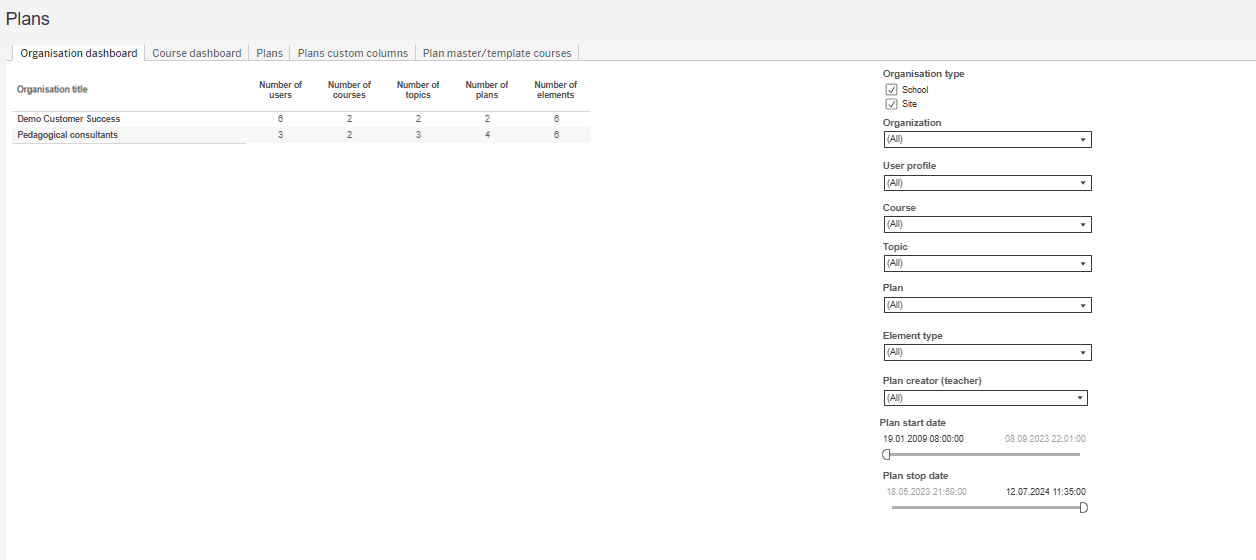
This report shows plan data across the site. It contains the following tabs: Organisation dashboard, Course dashboard, Plans, Plans custom columns, and Plan master/template courses. The organisation dashboard shows the number of users, courses, topics, plans, and elements per organisation. The data can be filtered by organisation type, organisation, user profile, course, topic, plan, element type, plan creator (teacher), and plan start and stop date.
Customised Advanced Reports
All the reports in the Advanced Reporting suite give districts options to filter and aggregate data in ways that are unique to their administrative organisation, curriculum, or evaluation programmes.
In addition, itslearning offers a service to create new reports based on the LMS data. This requires an additional investment by the district and is customised to their specific requirements. Once created, the reports are added to the reporting suite in perpetuity. Contact your itslearning representative to find out more.
Data Warehouse
Most key student data, such as learning progress and grades, can be accessed through the Data Warehouse. The Data Warehouse is designed to be accessed by organisations' analytical systems, which can access the information via the oData standard. Like many such warehouses, the information has been standardised so it is easier for third-party systems to import and understand.
The Data Warehouse is updated overnight: if data is imported today, it is yesterday's data.
The Data Warehouse is an optional package, but is part of the Advanced Reporting suite. Access is granted via a site setting, and any customer who uses Advanced Reporting can enable it via a request to the itslearning support portal. Further information is available in the itslearning Developer Portal.
More Help Resources
Have more questions? Please start with asking your school administrator.
Product Release notes
Stay updated with itslearning latest releases: https://itslearning.com/product-updates
Service Status
Check the current status of itslearning services: https://status.itslearning.com/
Ideas Portal
Share your ideas and help shape the future of itslearning: https://ideas.itslearning.com/
Roadmap
Check out our roadmap: https://itslearning.com/global/roadmap/