-
-
- Users and access rights - Reference (Sysadmin)
- Supervisor (Mentor and Headteacher) Roles - Configuration (Sysadmin)
- Workflow - Behaviour and Assessment Visibility (Sysadmin)
- Hierarchy - Reference (Sysadmin)
- Hierarchy - Roles and Permissions (Sysadmin)
- User Management - Importing Users by CSV (Sysadmin)
- Profile Pictures and Avatars - Reference (Sysadmin)
- User Management - Importing Parents by CSV (Sysadmin)
-
- Course Catalogue - Setting Up (Administrator)
- Individual Learning Plans - Template Configuration (Administrator)
- Courses - Administration Reference (Administrator)
- Projects - Administration (Administrator)
- Bookings - Managing Rooms and Resources (Administrator)
- Terms - Managing Terms Manually (Administrator)
- Learning Objectives - Report Settings (Administrator)
- Learning Objectives - Repository (Administrator)
- Learning Objectives - Importing a Repository via XLSX (Administrator)
- Trash Can - Overview (Administrator)
- Cross-site Templates - Overview (Administrator)
- Attendance system
- Courses - Creating Import Files for Course Import (Administrator)
- Calendar - Managing External Calendars for Organisations (Administrator)
-
- Automated integration with a Student Information System
- LTI Integrations
- Single Sign-On - Updating SAML IdP Metadata and Certificates (Sysadmin)
- SIS Integration – IMS Enterprise Import Status Emails (Sysadmin)
- Test Mode Browser (Overview)
- Test Mode Browser – Installing the itslearning LockDown Browser Extension for Chromebooks (Sysadmin)
- Microsoft Cloud Services – Connecting Microsoft 365 to itslearning (Sysadmin)
- MS Team Integration - setup
- Outlook integration - Paid add-on
- Connecting your G Suite domain to itslearning
- Swedish integration- Skola24 – Calendar Integration for Swedish Customers (Sysadmin)
- German integration- Univention UCS@school – Provisioning API (Sysadmin)
- German integration- Univention UCS@school - ID Broker Connector (Sysadmin)
- Univention UCS@school – Itswizard) Connector (Sysadmin)
- Dutch integration: Timetable integration -
- Dutch integrations - Timetable Integration Notification – Assigning Appointments
-
-
- Main menu - Overview (Teacher)
- Login - Getting started
- Navigation - Getting started (Teacher)
- Personal settings - Getting started
- Courses - Getting started (Teacher)
- Plans - Getting started (Teacher)
- Resources and activities - Getting started (Teacher)
- Resources and activities - Overview (Teacher)
- Assignments - Getting started (Teacher)
- Tests - Getting started (Teacher)
- Calendar - Getting started (Teacher)
- Messages - Getting started (Teacher)
- Keyboard shortcuts - Overview
-
- Notification Preferences – Overview (Teacher, Admin)
- Profile Pictures and Avatars – Overview (All users)
- Personal Settings – Overview (All users)
- Product Updates – Release Note Sharing (All users)
- Supervisor Roles – Mentors and Headteachers (Teacher)
- Font Selection – Overview (All users)
- Rich Text Editor – Reference (All users)
- Search – Overview (All users)
-
- Course Focus - Choosing the Right Course Type (Teacher)
- Class Course – Reference (Teacher)
- Self-Paced Courses – Complete Guide
- Information hub course – Overview
- Subject Course settings - Reference (Teacher)
- Course Participants Page (Teacher)
- Course Templates – Reference (Teacher)
- Using the course catalogue (Teacher)
- The permission system - Admin and teacher guide
- Learning Objectives – Reference (Teacher)
- Courses – Student View (Teacher)
- Courses – Archiving (Teacher)
- Course Card Images
- Image selector - Teacher guide
- Course Templates – Cross-Site Templates (Teacher)
- Teacher - Course Import Guide
- Teacher - Course export guide
-
- Resources – Overview (Teacher)
- Resource Page – Reference (Teacher)
- Immersive Reader – Overview (All users)
- Test – Updating from Test 2.0 to Test 3.0 (Teacher)
- Files – Overview (Teacher, Student)
- Files – Saving Course Materials (All users)
- Library – Reference (Teacher)
- Brand Icons – Reference (All users)
- H5P – Upload and Play Content (Teacher)
-
- Assignment – Reference (Teacher)
- Tasks – Overview (Teacher)
- Discussions – Reference (Teacher)
- Registrations – Reference (Teacher)
- Learning Paths – Reference (Teacher)
- Tests – Reference (Teacher)
- Survey Tool – Reference (Teacher)
- Page – Create and Manage Content (Teacher)
- Assignment – Combined Assignment and Task Tool (Teacher)
- Assignment – Custom Labels (Teacher)
- SCORM – Importing and Using Content (Teacher)
-
- Reports - Overview (Teacher)
- Assignment Report - Overview (Teacher)
- Progress Report – Reference (Teacher)
- Learning Objectives Alignment Report - Overview (Teacher)
- Learning Objectives Progress Report - Overview (Teacher)
- Attendance – Overview (Teacher)
- 360° Reports – Overview (Teacher)
- 360° Reports – Activity Report (Teacher)
- 360° Reports – Progress Report (Teacher)
- 360° Reports – Grades Report (Teacher)
- 360° Reports – Resources Summary (Teacher)
- 360° Reports – Notifications and Weekly Updates (Teacher)
- Assessment Record / Gradebook - Reference (Teacher)
- ePortfolio – Overview (Teacher)
- ePortfolio – Managing Your Portfolio (Teacher)
-
- LTI tool – adding external tools to a course (2026)
- H5P integration – Creating a Learning Activity in a Plan (Teacher)
- Microsoft Office templates in the Assignment tool
- Google templates in the Assignment tool
- Using MS Teams in itslearning and Fronter 19
- Using Google Meet in itslearning and Fronter 19
- Equation editor - iMathEQ
- Accessibility Checker (Plugin)
- MS Teams Integration
-
-
-
Getting started with plans
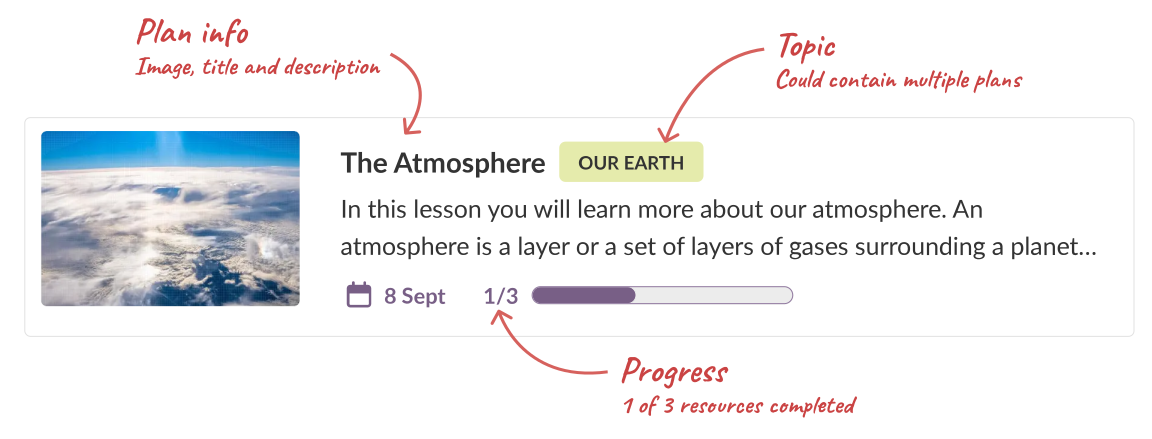
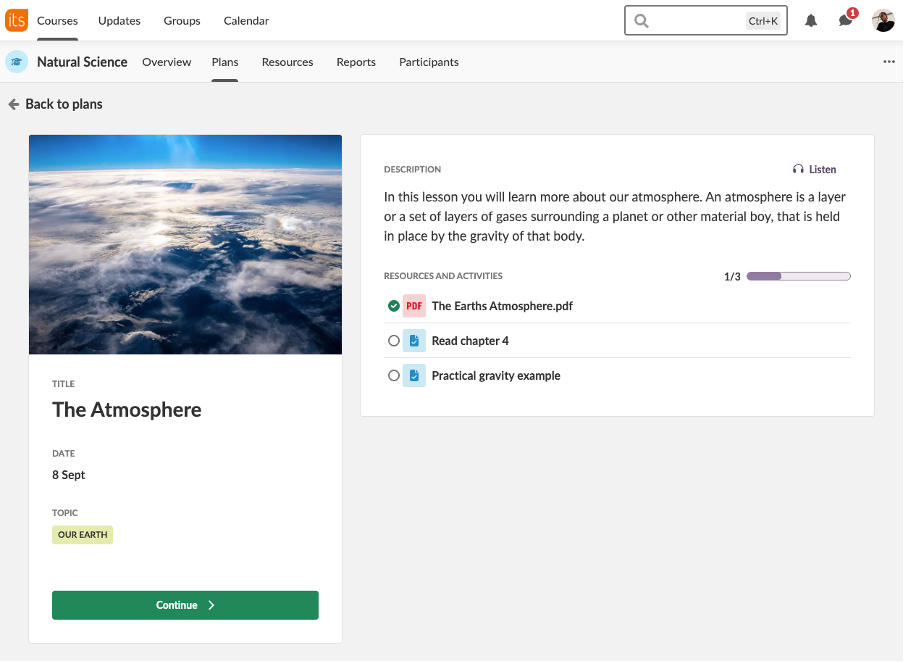
Plans help you structure your teaching and give students a clear overview of their learning. Instead of assigning individual tasks, you can bring together assignments and learning resources in a single plan.
Each plan is displayed as a plan card...
Plans help students
- → Keep track of their progress
- → See which tasks have been completed and which remain
- → Find relevant learning resources
- → Work independently
Group plans into topics
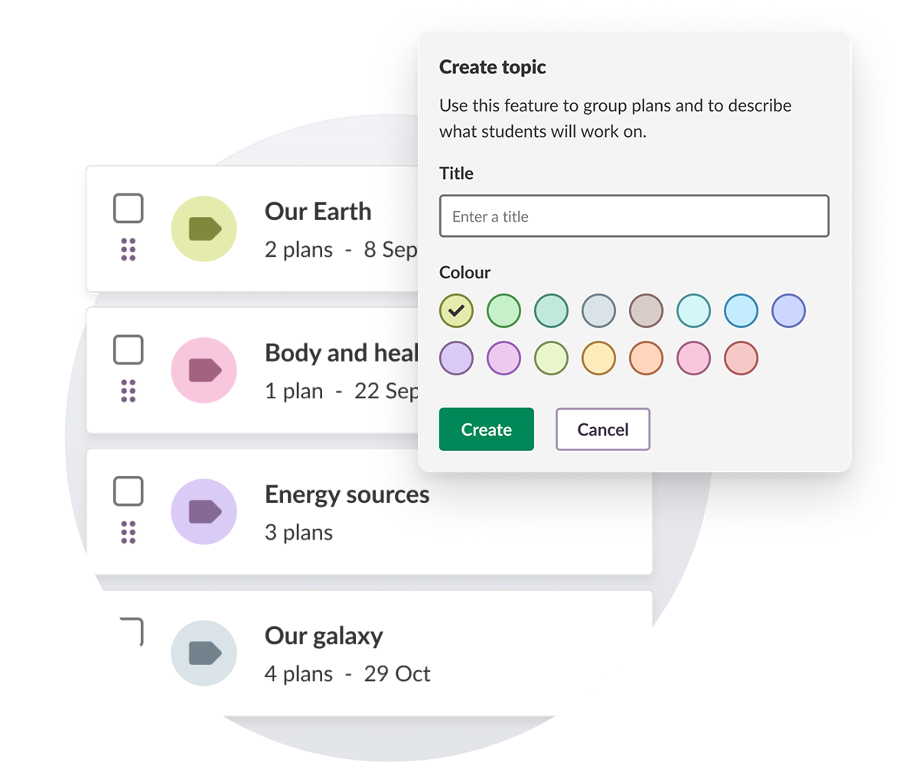
Use topics to organise related plans. The topic title is displayed on each plan, making it easier for students to recognise plans that belong together.
How to create a new plan
Once your plan is ready, you can share it with your students, update it at any time and reuse it across other subjects or future academic years.
Video placeholder: insert the video for “How to create a new plan” here.
Learn more about plans
Explore everything you need to know about creating, managing and sharing plans.